**Applies to:** Google Docs in a desktop web browser. Work account sharing options may be limited by your administrator.
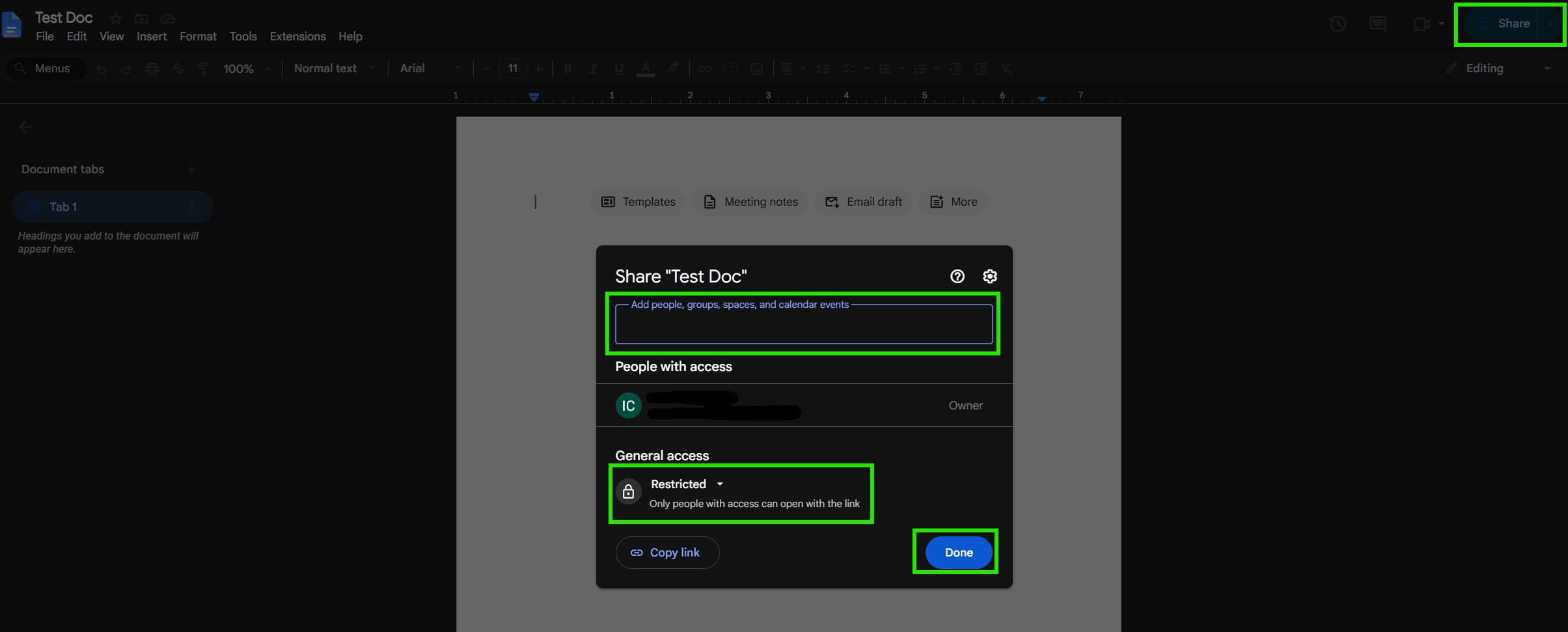
## Share with specific people
1. Open the document and select Share.
2. Enter the person’s work email address.
3. Choose the access level they need: Viewer can read, Commenter can comment or suggest, and Editor can make changes.
4. Review the access level and recipient, then select Done.
For documents that should only be available to named people, leave General access set to Restricted. Choose Anyone with the link only when broader access is intended and allowed by your organization.
## Add a comment
1. Select the text you want to discuss.
2. Select Add comment in the toolbar (or use Insert > Comment).
3. Type your comment, then select Comment. On Windows, Ctrl+Enter also posts the comment.
## If someone can’t open the document
Confirm they are signed into the account you shared with. If they still see You need access, ask them to request access or check the sharing list.
## Related Google Guidance
Was this article helpful?
That’s Great!
Thank you for your feedback
Sorry! We couldn't be helpful
Thank you for your feedback
Feedback sent
We appreciate your effort and will try to fix the article